
A Vimeo data breach leaked user information through a third-party service. Here’s what happened, who may be affected, and how to protect your data.
Table of Contents
What Happened?
The incident happened in April 2026. Attackers did not break into Vimeo directly. Instead, they got in through Anodot, an analytics service connected to Vimeo’s systems.
A cybercrime group known as ShinyHunters claimed responsibility. The group is known for stealing large amounts of data and then demanding payment to keep it private.
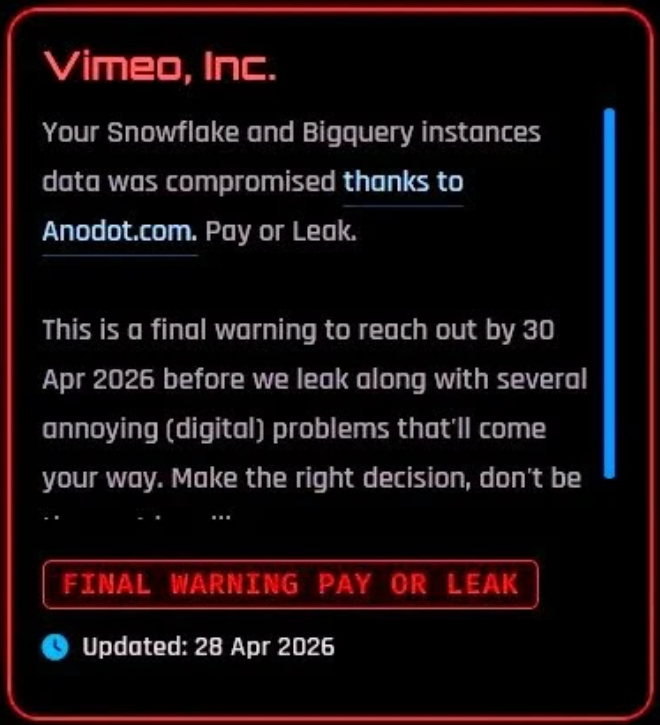
After the attack, the group published a large archive of stolen data online when the company did not meet their demands.
Vimeo said the issue did not affect its core systems, and the platform continued to work normally during and after the incident.
Who Is Affected and What Data Was Taken?
The breach affected around 119,000 users.
The leaked data mainly includes:
- Email addresses
- Names
- Metadata related to accounts
- Video titles
- Technical data, including system information and technical logs
Most of the data was technical, not personal. But leaked email addresses can still lead to follow-up attacks.
Vimeo confirmed that the following were not leaked:
- Passwords
- Login credentials
- Payment card information
- Actual video content
Breaches like this can feel stressful, especially if you’re unsure if your data was affected.
Futureproof takes the guesswork out of it. You can check if your email was leaked in seconds and get simple steps to protect your account.
How Did the Vimeo Data Breach Happen?
Here’s how it happened, step by step:
- Attackers broke into a company called Anodot
Anodot is a service that Vimeo used to analyze system data. It had access to parts of Vimeo’s information.
- They stole special access keys (called tokens)
These keys acted like trusted passes. They allowed Anodot to connect to Vimeo’s data without needing passwords.
- Attackers used those keys to enter connected systems
Because the access looked “trusted,” they didn’t need to hack Vimeo directly. They simply used the existing connection.
- They reached Vimeo-related data through that connection
This included mostly technical information, along with some basic user details.
- They collected the data and later published it
After failed negotiations, the group leaked a large amount of stolen data online.
Vimeo’s front door was locked. But a trusted partner had a key, and attackers stole that key.
That’s why third-party data breach attacks like this are becoming more common. Over the past few years, these attacks have grown rapidly — nearly four times more than before.
Companies rely on many connected tools, and each one can become a weak point.
Futureproof monitors your information for data leaks 24/7 and guides you with clear steps to keep it safer from scams.
Run a free checkHow Scammers Can Use Leaked Data Against You
Even if the data looks simple, it can still be used in attacks.
When a criminal has your email and knows you use Vimeo, they can send messages that feel real and personal.
Here’s how scammers usually work:
- They pretend to be Vimeo
You may get an email that looks like a real message from Vimeo.
For example: “Your Vimeo account will be closed due to suspicious activity. Please review immediately.”
Some fake emails even use sender names that look official to trick you. If you trust the message, the attacker can lead you into replying. This is how they start getting access to your information or your account.
- They ask you to “verify” your details
The message may say there’s a problem with your account and you need to act fast.
For example: “We noticed a payment issue. Please confirm your details to avoid service interruption.”
Some emails even include fake invoices or payment alerts to make the message feel urgent. If you respond, the attacker can collect your personal details or payment information.
- They send you to a fake website
The email includes a link that looks real, but it’s not.
For example: “Click here to restore your account,” and the link takes you to a page that looks like Vimeo, but the web address is slightly different (like vimeo-verify123.com).
If you enter your login details on a fake site, attackers can steal them and access your account.

How to Stay Safe in 3 Easy Steps
These small habits help protect your data and give you peace of mind:
1. Be careful with unexpected emails
If you get an email about your Vimeo account, don’t trust it right away.
Check the sender’s address and look for small mistakes. Real companies don’t rush you to act fast or threaten you.
2. Go directly to websites
If an email tells you to log in or fix something, don’t click the link.
Open a new browser window and type Vimeo.com yourself. This helps you avoid fake websites.
3. Secure your email account
Create a long, hard-to-guess password and use a different one for every account. Then turn on two-step verification in your settings.
Each time you log in, you’ll get a code on your phone or email. Even if someone gets your password, they won’t be able to access your account without that code.
If this feels confusing or easy to put off, that’s completely normal. Most people don’t know where to start.
Futureproof Email Protection walks you through it step by step.
Email Protection shows you how to create strong passwords you can remember and explains two-step verification in a short, simple video so you can set it up quickly and without stress.
The Bottom Line: You Can Do Everything Right and Still Be Affected
Your information can be affected even if you did nothing wrong.
Vimeo itself was not the entry point. The leak came from a connected third-party service.
That means even careful users can be pulled into situations like this.
So what actually helps?
- Stay cautious when you get emails that mention services you use.
- Don’t click links and go to the website yourself.
- Secure your email account, and pause before acting when something feels urgent.
Small habits like these don’t just protect your accounts. They keep you calm, in control, and one step ahead of scams.

At Futureproof, Kevin explains digital safety in simple words, with clear tips and zero fluff. He holds a degree in information technology and studies fraud trends to keep his tips up-to-date.
In his free time, Kevin plays with his cat, enjoys board-game nights, and hunts for New York’s best cinnamon rolls.