PrivacyHawk is a relatively new safety tool that’s built around a problem many people do not notice: your personal information is already spread across the internet, even when you think it’s not.
That can lead to spam calls, unwanted emails, scam attempts, and a general feeling that too many strangers know too much about you.
PrivacyHawk tries to solve this by helping users find where their information appears online and then remove it.
That can be useful. But is PrivacyHawk the best fit for you? Let’s find this out.
Table of Contents
What Is PrivacyHawk?
PrivacyHawk is a personal data protection app founded in 2021 in Los Angeles. Its core idea is that your digital footprint — your name, address, phone, email, and financial details — has spread to thousands of databases. Many of these databases are happily selling it to advertisers, scammers, and data brokers.
PrivacyHawk uses patented AI to find those exposures and automatically send deletion requests on your behalf.
It’s a mobile-first service — iOS and Android only — with over one million users and coverage across 10,000+ companies and 100+ data broker sites.
PrivacyHawk’s Key Features
- Digital footprint protection — scans thousands of companies holding your personal data, sends automated opt-out and deletion requests, and re-scans monthly to catch new exposures
- Data broker removal — specifically targets people-search and data broker sites that sell your name, address, and contact info, with custom removal requests available
- AI-powered spam unsubscribe — scans your inbox, automatically unsubscribes you from spam senders, and keeps re-scanning as new ones appear
- Privacy Score — a 300–850 score (like a credit score) that shows how exposed your personal data is across the web
- Identity theft protection and insurance — $5M coverage with white-glove restoration support, dark web monitoring, and alerts for SSN, credit, passport, bank accounts, and more (Platinum plan only)
- RoboHawk — a separate companion app that blocks spam calls and texts, free for Platinum subscribers
PrivacyHawk Pricing
All plans are available on yearly or monthly billing and can be cancelled anytime. The company doesn’t offer a free trial.
| Plan | Monthly | Annual | Who it covers |
| Premium | $19.99/mo | $74.99/yr | 1 person |
| Platinum | $29.99/mo | $124.99/yr | 1 person |
| Premium Family | $39.99/mo | $199.99/yr | 4 people |
| Platinum Family | $49.99/mo | $299.99/yr | 4 people |
Note: Dark web monitoring, SSN and credit alerts, $5M identity theft insurance, and priority 24/7 support are all Platinum-only. The Premium plan covers broker removal and spam unsubscribe, but doesn’t include identity protection.
PrivacyHawk Pros and Cons
PrivacyHawk is useful if your main problem is too much personal information floating around online. But it may not be the best fit if you mostly want simple data leak alerts and step-by-step help after a leak.
| Pros | Cons |
| Free scan lets users check their exposure before paying | The most useful features require a paid plan |
| Helps remove personal information from data broker and people-search sites | Full identity protection is only available on the Platinum plan |
| Smart unsubscribe tool helps reduce unwanted emails | The product is mainly mobile-app-based, which may not suit everyone |
| Premium plans include ongoing monitoring and removals | Data removal requests do not guarantee that information stays gone forever |
| Platinum includes dark web monitoring, identity theft support, and insurance | It is less focused on explaining leak alerts in simple, human terms |
One important limitation is that data removal is never instant or perfect.
PrivacyHawk’s own terms mention that information may remain available after removal requests, reappear later, or not be removed if a third party refuses or delays processing.
But that is not unique to PrivacyHawk. It is a limitation of the whole data removal industry.
Where PrivacyHawk Stands Out
PrivacyHawk works best when your problem is exposure of personal information across many places at once.
For example, it may be useful if:
- Your personal information appears on people-search sites
- You want fewer spam calls or unwanted emails
- You have many old accounts and signups
- You want help sending opt-out or deletion requests
- You want data removal and identity protection in one app
Its strongest value is prevention. By reducing how much information is available about you, PrivacyHawk may help lower your exposure to spam, scams, and unwanted contact.
Where PrivacyHawk May Not Fit You
PrivacyHawk is less helpful if your main concern is data leak alerts.
If your email appears in a leak, your first question is usually not, “How do I remove myself from data brokers?”
It is more likely:
- What exactly has been leaked?
- Which account is affected?
- Could scammers use this against me?
PrivacyHawk can help with broader privacy cleanup, especially on paid plans. But if you want calm, simple guidance after a data leak, Futureproof can help you better.
Futureproof: 24/7 Email Leak Monitoring and Support
This digtal safety solution focuses on a very specific problem: regular people often do not know what to do after their email appears in a data leak.
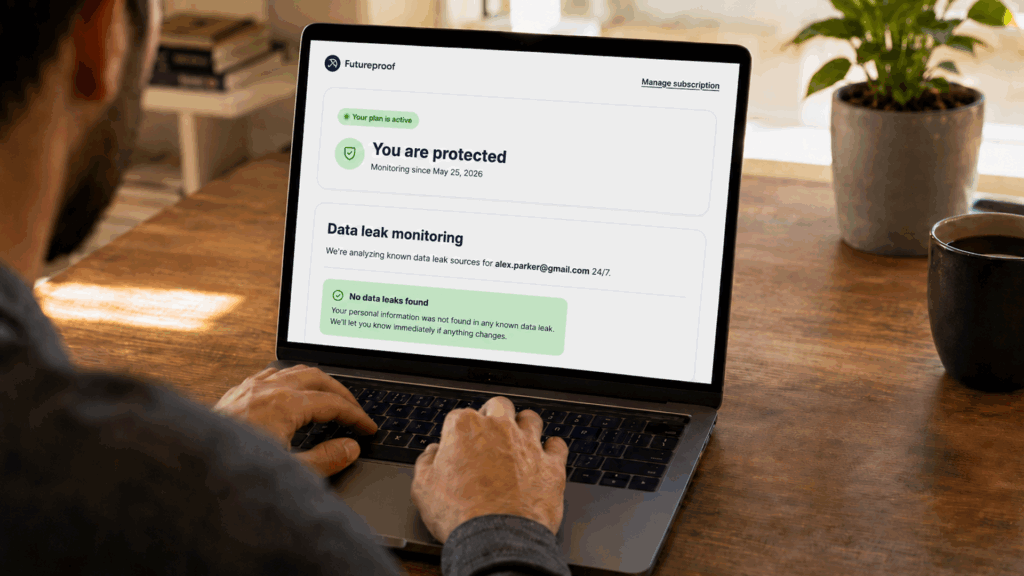
Futureproof monitors email accounts for data leaks 24/7 and alerts you when your personal information may be exposed.
But the real value is what comes next: you can get help from a security specialist who explains the risk and offers an action plan in simple English. This way, you’re not left alone with your problem when you need it most.
The support feature is included in the subscription for all users.
Futureproof also offers a free Chrome extension that helps you manage website permissions like camera, microphone, location, and notifications in one simple click. This gives you a practical way to improve everyday privacy without digging through browser settings.
PrivacyHawk vs Futureproof: How They Compare
| Feature | PrivacyHawk | Futureproof |
| Main focus | Data removal and digital footprint cleanup | Email leak monitoring and clear next steps |
| Best for | People who want to remove personal info from brokers and old databases | People who want to know if their email leaked and what to do next |
| Data broker removal | Yes | Not the main focus |
| Email leak monitoring | Available through higher privacy/identity features | Yes, 24/7 email leak monitoring |
| Human guidance | Support available, stronger on higher plans | Guidance from digital safety specialists |
| Identity theft insurance | Included on Platinum | Not a full identity theft insurance product |
| Browser privacy | Not the main focus | Free Chrome extension for camera, microphone, location, and notifications |
| Best everyday use case | Reducing public personal information online | Responding to data leak alerts with simple guidance |
How Futureproof Is Better for Regular Users
1. Futureproof answers the question people actually ask
Any regular internet user deserves to know what happens after a data leak and, most importantly, how to fix it.
Futureproof answers that question directly and in simple words. It focuses on email leak monitoring, alerts, and what to do after exposure.
2. It gives clearer next steps after a leak
A data leak alert can feel stressful because it is often not clear. Futureproof helps turn that alert into a simple action plan.
That might mean changing a password, checking a specific account, turning on two-factor authentication, or watching for scam messages.
3. It is less complicated
PrivacyHawk has many useful tools: opt-outs, broker removals, digital footprint scans, smart unsubscribe, dark web monitoring, identity insurance, and restoration support.
That can be helpful, but it can also feel excessive.
On the other hand, Futureproof is more focused and simple. It helps you understand leak alerts and act quickly without managing a full privacy cleanup system.
4. It adds simple browser permission control
Futureproof’s free Chrome extension helps you manage which websites can access your camera, microphone, location, and notifications.
This matters because many people click “Allow” once and forget about it. Futureproof makes those permissions easier to review and control.
Final Takeaway: Is PrivacyHawk Worth It?
PrivacyHawk is worth considering if you want help removing your personal information from data brokers, people-search sites, company databases, and unwanted email lists.
It is especially useful if you want to reduce your digital footprint and become harder to find online.
But if your main concern is data leaks, Futureproof may be the better fit. It is simpler for regular users who want email leak monitoring, fast alerts, human guidance, and practical next steps after exposure.
Either way, the sooner you understand what’s happening with your data, the easier it is to take control before the problem affects your daily life.

At Futureproof, Kevin explains digital safety in simple words, with clear tips and zero fluff. He holds a degree in information technology and studies fraud trends to keep his tips up-to-date.
In his free time, Kevin plays with his cat, enjoys board-game nights, and hunts for New York’s best cinnamon rolls.