The FBI and Google disrupted Outsider Enterprise, a phishing service tied to fake texts and stolen payment data. Here’s how to spot similar messages before they cost you money online.
Table of Contents
What Happened to Outsider Enterprise?
Phishing-as-a-service means criminals sell ready-made phishing tools that help other scammers create fake websites and trick people into entering private information.
The FBI said it seized multiple administration servers, a Shopify storefront, and an account used to test the phishing service. It also took over a Telegram bot that stored stolen information.
Investigators also recovered about $100,000 in USDT cryptocurrency.
Google filed a civil lawsuit against the operation on June 12, 2026. The company said Outsider Enterprise helped criminals send fake texts that looked like trusted brands.
Google said it is also working with AT&T, T-Mobile, and Verizon to block fraudulent texts before they reach people.
Who Was Affected and What Data Was Stolen?
The full number of victims has not been publicly shared. Google said hundreds of thousands of people were financially scammed through Outsider Enterprise.
The operation was connected to about 9,000 fake websites and more than 1 million fraudulent URLs. A URL is a web address.
Google also said 2.5 million text messages were sent to Android users over two weeks in May 2026.
The FBI said the phishing platform helped criminals steal more than 3.8 million credit card records. The reported losses were about $1.9 billion.
The stolen information included credit card data and passwords, based on the available reports. The source did not list every type of personal information taken.
This matters because criminals can use card details and passwords to steal money, enter accounts, or send more convincing phishing messages.
Your information may also be exposed in other data breaches or data leaks. This can happen through a school, employer, store, or online service that stored your data.
That is why it is helpful to check for data leaks regularly. But checking everything yourself can take time.
Automatic monitoring can help you spot problems earlier.
Futureproof monitors your data for leaks 24/7 and helps you reduce scam risks with simple, clear steps.
Futureproof monitors your information for data leaks 24/7 and guides you with clear steps to keep it safer from scams.
Run a free checkHow Outsider Enterprise Helped Criminals Send Fake Texts
Outsider Enterprise sold phishing kits. A phishing kit is a ready-made tool for building fake websites and stealing information.
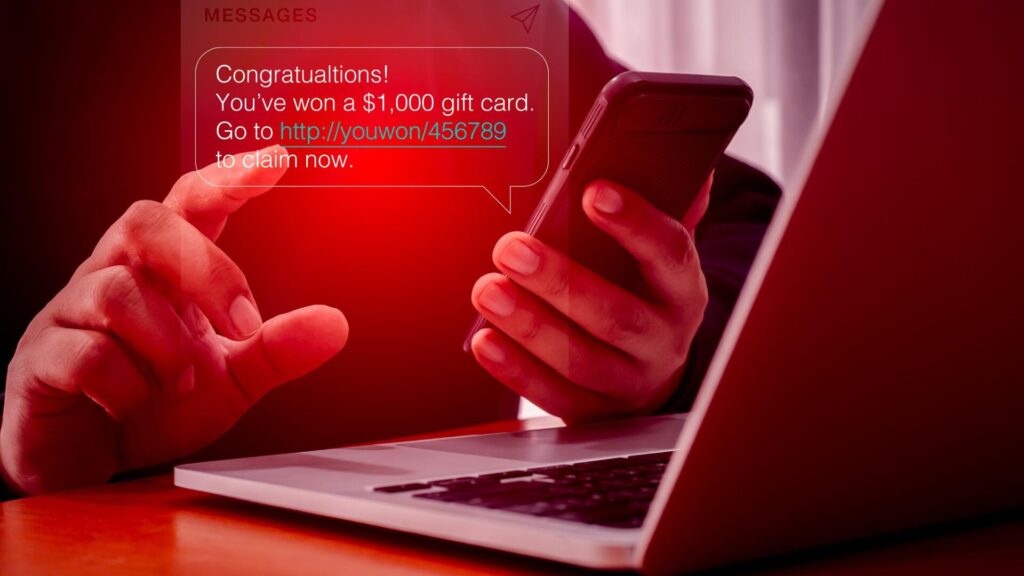
These kits helped criminals create fake pages that copied well-known brands. The fake pages were then sent through text messages.
A message might look like a package alert, bank warning, toll notice, or account problem.
The goal was to make people click a link and enter card details, passwords, or other private information.
Google said the group coordinated through Telegram and used AI tools to help create phishing websites.
Why Fake Texts Are Getting Harder to Spot
This case matters because fake texts now look more polished than they did years ago.
You may see a familiar company name, a realistic website, and urgent wording in the same message. That combination can pressure you to act fast.
That means a careful person can still be tricked by a realistic message.
Slow down when a text asks you to click, pay, verify, or sign in.
5 Simple Ways to Avoid Fake Text Phishing
You cannot control every fake text that reaches your phone.
However, these habits can help you avoid handing information to criminals:
1. Don’t click the link
Be careful with texts about packages, tolls, banks, refunds, or account problems.
Criminals copy real company names to make fake links look trustworthy.
Do not click the link in the message. Open your browser and type the company’s website yourself.
2. Go directly to the company
Watch for messages that ask you to pay, sign in, or “verify” your information.
Criminals use urgent language because rushed people make faster mistakes.
Use the company’s official app or website. For banks or cards, call the number on the back of your card.
3. Protect your email account
Your email connects to many of your online accounts.
If someone gets access to it, they may reset passwords for your other accounts.
Use a strong password and turn on two-step verification. This adds a second code when you sign in.
On most accounts, open Settings, then Security. Look for Password and Two-Step Verification or Two-Factor Authentication.
Need help setting up extra protection? The Futureproof Email Protection tool guides you step by step.
Email Protection helps you create strong passwords and set up two-step verification to secure your account.
4. Watch your card activity
Look for small charges you do not recognize, not only large ones.
Criminals often test stolen cards with small purchases before making bigger ones.
Open your bank or card app and turn on transaction alerts. Look under Settings, Alerts, or Notifications.
If you see a charge you do not recognize, call your bank using the number on your card.
5. Report and block fake texts
Do not reply to suspicious messages, even with “stop.” Replies can tell criminals that your phone number is active.
On iPhone, tap Report Junk if you see the option. On Android, open the message menu and choose Report spam or Block.
The FTC advises people in the United States to forward suspicious texts to 7726, which spells SPAM on your phone keypad.
The FCC also says most mobile carriers let you report spam texts this way. This helps your mobile carrier identify and block similar messages.
A Text Message Can Look Real and Still Be Dangerous
The Outsider Enterprise case shows how organized phishing has become.
Criminals can now rent tools, copy trusted brands, and send fake messages at a huge scale.
Your best protection is a calm pause before you click. Check links, use official websites, protect your email, and watch your card activity.
A few careful habits can give you more confidence each time a suspicious message appears.

At Futureproof, Kevin explains digital safety in simple words, with clear tips and zero fluff. He holds a degree in information technology and studies fraud trends to keep his tips up-to-date.
In his free time, Kevin plays with his cat, enjoys board-game nights, and hunts for New York’s best cinnamon rolls.