
A simple Google search for a travel insurance phone number led one traveler to a scammer. Here’s what happened, what data was taken, and how to keep your information safe.
Table of Contents
What Happened?
The traveler, Rosette, had recently rescheduled a flight. The airline told her to contact Allianz, a large global insurance company, to request a refund.
She went to Google, searched the company name, and clicked the first phone number she saw.
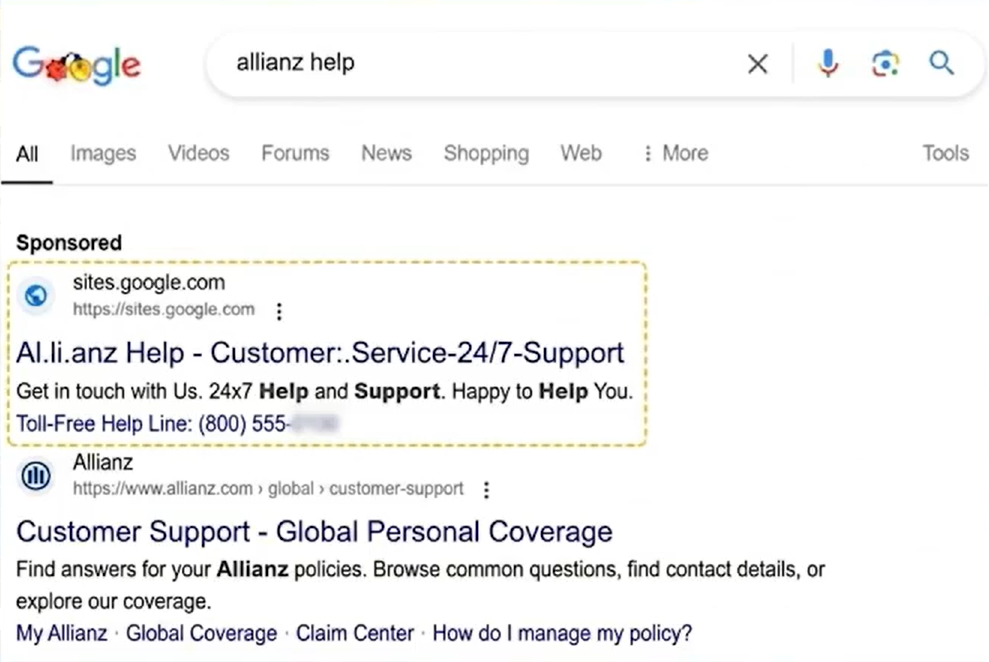
The call was answered right away. The man sounded calm, professional, and helpful, so Rosette believed she was speaking with a real customer service agent.
At first, everything felt normal. The conversation moved quickly, just like a real support call.
Then things started to feel off. The price he quoted seemed unusually high.
Soon after, she received a confirmation email — but the domain didn’t match Allianz’s official website.
That’s when she realized something was wrong. She understood she had not reached the real company — she had been talking to a scammer.
Who’s at Risk — and What Data Was Taken?
This type of scam is called a search result scam, and it can affect anyone.
It often happens when you’re in a hurry — booking travel, fixing a bill, or trying to solve a problem quickly.
In Rosette’s situation, the scammer collected:
- Credit card number
- Date of birth
That may not seem like a lot at first. But it’s enough.
With just those details, scammers can:
- Try small charges later
They may test your card with a small purchase, like $1–$10, to see if it still works without raising suspicion.
- Pretend to be you
They can use your name and date of birth to call companies and try to reset passwords or get access to your accounts.
- Pass your information to other criminals
They may sell your details on the dark web — hidden parts of the internet where stolen data is traded. Other scammers can then use that information to target you later with new calls, messages, or fraud attempts.
Most importantly, the damage doesn’t always happen right away.
If you’re not sure whether your information was leaked, it’s worth taking a moment to check.
With Futureproof, you can quickly find out if your email was leaked and get simple steps to lock down your account.
How the Search Result Scam Works: 5 Steps
Here’s how the search result scam usually plays out:
- You search for a company on Google
- A fake phone number appears near the top of the results
- You call it, thinking it’s the real company
- A scammer answers and asks for your personal or payment details
- You share your information — and the scammer disappears
Futureproof scans your data for leaks and shows exactly how to close security gaps — before scammers find them first.
Check my safetyIn Rosette’s case, there were a few small details that didn’t feel right at first:
- The company name in the first Google result didn’t exactly match the real one (Al.li.anz instead of Allizans)
- The call was answered immediately
- The price sounded higher than expected
- The follow-up email came from a strange or unfamiliar domain
- The agent pushed her to approve the charge quickly
- The moment she started asking questions, the tone changed. And then the call ended.
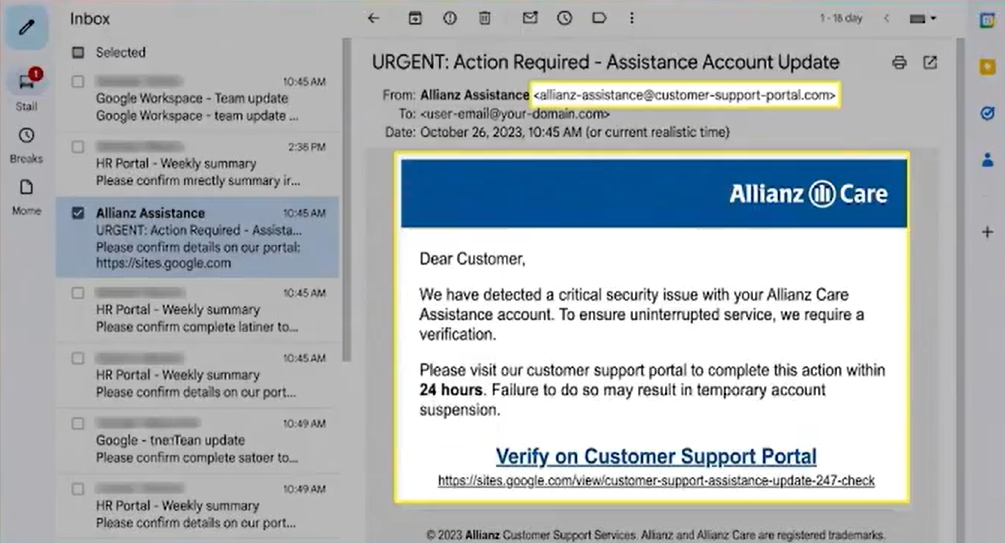
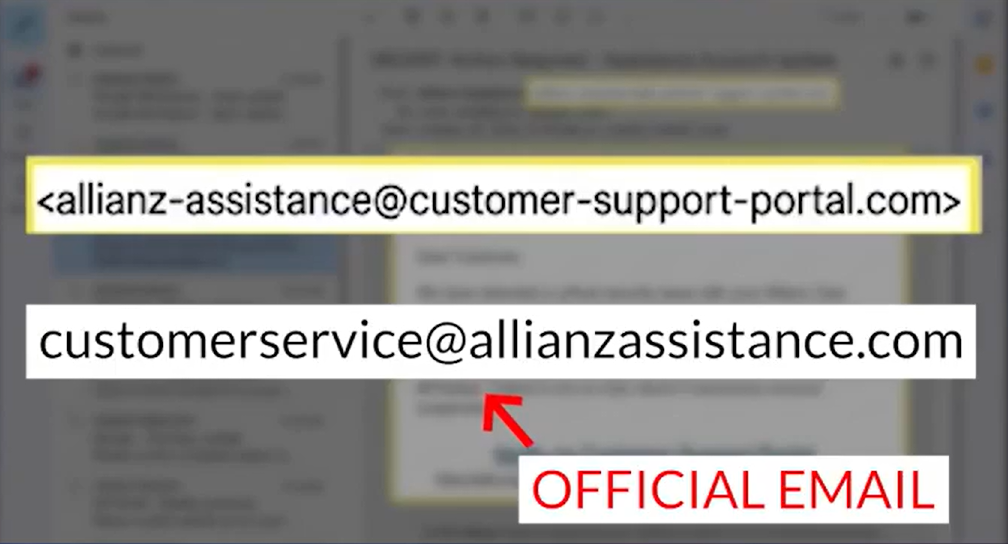
That’s often how these scams work — smooth at first, then gone the second you hesitate.
What This Case Teaches You
The search result scam doesn’t hack your phone or break into your accounts. It simply tricks you into calling the wrong number — and that can happen to anyone.
You could be:
- Booking a flight or trying to change your travel plans
- Calling a company about a charge on your account
- Looking for help with a reservation, delivery, or a small issue
Once you share your information, you lose control over where it goes next.
This isn’t just a one-off situation. Similar scams are common in travel, especially with fake airline support calls and reservation problems.
These scams work because everything feels normal, and you believe you’re speaking with a real company.

How to Protect Yourself in 5 Simple Steps
Here are five simple steps that can help you avoid the search result scam:
1) Don’t trust phone numbers from search results
Skip the number you see on Google. Open the company’s official website yourself and go to the “Contact” page to find the real number.
2) Use a number you already trust
Look at your booking email, billing statement, or the back of your credit card. These are safer than anything you find in a quick search.
3) Pay attention to how the call starts
If someone answers right away and jumps straight into helping you, slow down. Real companies often have menus, wait times, or verification steps first.
4) Stop if they ask for sensitive details too soon
A real company won’t rush to ask for your full card number or personal details at the start of a call. If it feels too fast, hang up and call back using a verified number.
5) Act immediately if you shared information
Call your bank or card provider right away. Ask them to freeze or replace your card and watch for any unusual charges.
You’re More Likely to Call the Wrong Number When You’re in a Hurry
This kind of scam shows up in everyday situations when you’re trying to fix something quickly and move on. That’s when small mistakes are easier to make.
Scammers rely on that moment when you’re moving fast and not thinking twice. They don’t force their way in — they wait for you to act before you stop and check.
Go to the official website and use the number listed there. If something feels rushed, pause and check before you share anything.
Stay attentive — it’s the simplest way to protect your money and your data.

At Futureproof, Kevin explains digital safety in simple words, with clear tips and zero fluff. He holds a degree in information technology and studies fraud trends to keep his tips up-to-date.
In his free time, Kevin plays with his cat, enjoys board-game nights, and hunts for New York’s best cinnamon rolls.