
A recent Udemy data breach may expose 1.4 million user and corporate records. Here’s what happened, what data could be involved, and what it means for you.
Table of Contents
What Happened?
On April 24, 2026, ShinyHunters added Udemy to its leak site and posted a public warning to the company. The group gave Udemy three days (until April 27, 2026) to respond. If not, they threatened to release the stolen data publicly.
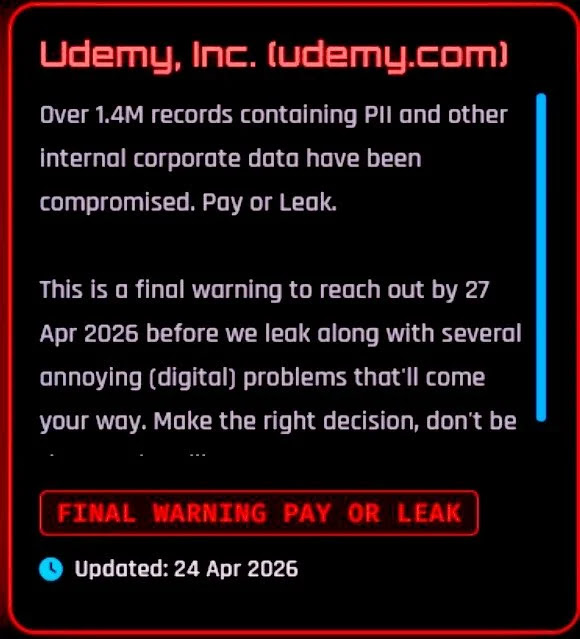
This is a common pressure tactic in data breach cases like this. The goal is to scare the company into paying before user data becomes public.
This tactic also matches the way ShinyHunters has acted in other cases: take the data, post a deadline, and use public pressure to force a response.
How Did It Happen?
The attack likely did not involve breaking into Udemy’s main system directly.
Instead, this campaign focuses on something simpler: access.
Groups like ShinyHunters often:
- use stolen employee login details
- target internal tools and cloud systems
- move through connected services
Security reports show this kind of attack is now common. Instead of hacking systems, attackers log in using real credentials.
This makes their activity harder to detect early.
And Udemy is only a part of a much bigger pattern.
In 2026 alone, ShinyHunters was responsible for attacks affecting:
- millions of users across tech, education, and SaaS companies
- companies using shared cloud systems and identity tools
- platforms where user data is stored in connected environments
Who Is Affected?
There is no confirmed total number of affected Udemy users yet.
But based on similar ShinyHunters attacks, some breaches exposed hundreds of thousands to millions of records. In other cases, attackers accessed large datasets across multiple companies.
So if your data was stored in Udemy, they may have taken it.
What Data Was Exposed?
According to the report, the data includes personal information and internal company records. The exact types of personal information were not mentioned yet.
Udemy has also not publicly confirmed or denied the breach.
So far, payment information, passwords, and login details of users are safe.
Futureproof monitors your information for data leaks 24/7 and guides you with clear steps to keep it safer from scams.
Run a free checkWhy This Case Matters — Even If You Don’t Use Udemy
This breach shows how one hacking group can attack many companies by getting into the tools they use to store and manage data.
It matters even if you’re not an active Udemy user because your personal information is rarely kept in just one place. Even if you gave your details to one company, your data may also sit inside:
- internal tools
- support systems
- cloud storage
- partner platforms
When attackers get into one connected system, they may reach data from many users, including you — sometimes across more than one company.
So the risk is bigger than one website.
Keep Your Information Safer in 3 Simple Steps
Your personal data could be exposed at any time. So the goal is to make it harder to use against you. Start with these three steps:
1. Be careful with any unexpected message
Watch out for emails, texts, or calls that mention an account you use.
This could be Udemy, your bank, your email, a shopping site, or any other service.
Do not click the link just because the message uses your name or looks real. Open the website yourself or use the official app.
2. Change reused passwords
Start with Udemy if you have an account there.
Then, if you used the same password on any other account, change it there too.
One leaked password can open the door to many accounts when you reuse it.
3. Secure your email
Your email is connected to many of your online accounts.
If someone gets into it, they can reset passwords for your other accounts.
Start by creating a strong password and turning on two-step verification to prevent risks. A strong password should be hard to guess but still easy for you to remember.
Futureproof Email Protection shows you how to do this step by step. It teaches you how to create passwords that are difficult to crack but still memorable, and explains two-step verification with a short, clear video so you can set it up fast and easy.
Futureproof also monitors your email 24/7 for data leaks and gives clear steps to secure your account from scams.
The Real Risk Starts When Your Info Is Vulnerable
Big, resonating breach cases have become common these days. That means your information has more chances to be reused somewhere else.
The best thing you can do to prevent that is to keep your digital hygiene in place. Use a different password for every account, secure your email, ignore urgent messages, and check your accounts regularly.
You can’t control every breach. But you can make sure your data becomes a hard target once it’s exposed.

At Futureproof, Kevin explains digital safety in simple words, with clear tips and zero fluff. He holds a degree in information technology and studies fraud trends to keep his tips up-to-date.
In his free time, Kevin plays with his cat, enjoys board-game nights, and hunts for New York’s best cinnamon rolls.
